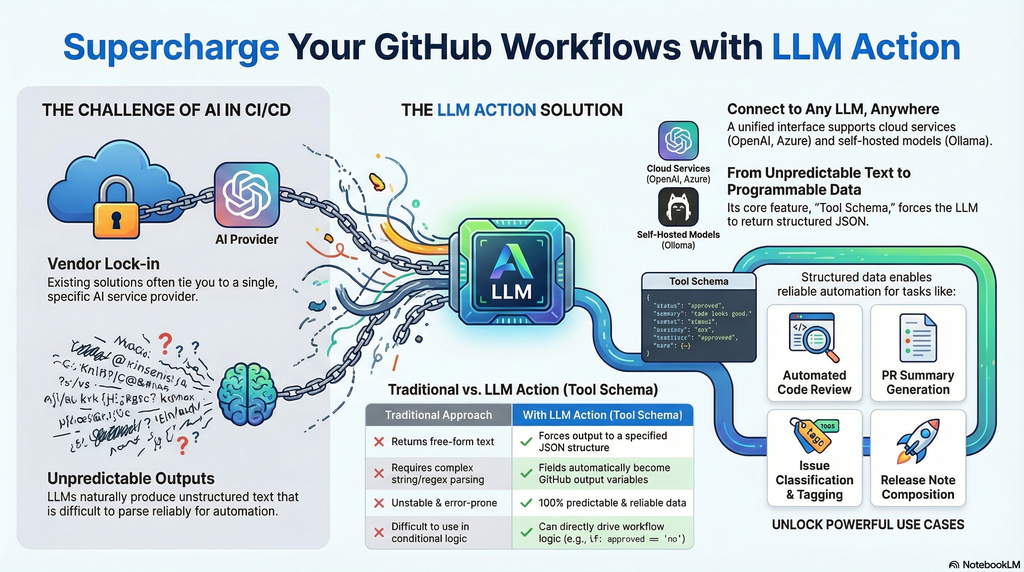
In the AI era, integrating Large Language Models into CI/CD pipelines has become crucial for improving development efficiency. However, existing solutions are often tied to specific service providers, and LLM outputs are typically unstructured free-form text that is difficult to parse and use reliably in automated workflows. LLM Action was created to solve these pain points.
The core feature is support for Tool Schema structured output—you can predefine a JSON Schema to force LLM responses to conform to a specified format. This means AI no longer just returns a block of text, but produces predictable, parseable structured data. Each field is automatically converted into GitHub Actions output variables, allowing subsequent steps to use them directly without additional string parsing or regex processing. This completely solves the problem of unstable LLM output that is difficult to integrate into automated workflows.
Additionally, LLM Action provides a unified interface to connect to any OpenAI-compatible service, whether it’s cloud-based OpenAI, Azure OpenAI, or locally deployed self-hosted solutions like Ollama, LocalAI, LM Studio, or vLLM—all can be seamlessly switched.
Practical use cases include:
- Automated Code Review: Define a Schema to output fields like
score, issues, suggestions, directly used to determine whether the review passes - PR Summary Generation: Structured output of
title, summary, breaking_changes for automatic PR description updates - Issue Classification: Output
category, priority, labels to automatically tag Issues - Release Notes: Generate arrays of
features, bugfixes, breaking to automatically compose formatted release notes - Multi-language Translation: Batch output multiple language fields, completing multi-language translation in a single API call
Through Schema definition, LLM Action transforms AI output from “unpredictable text” to “programmable data,” truly enabling end-to-end AI automated workflows.
Presentation (From AI)
Basic Usage
The simplest usage only requires providing an API Key, model name, and Prompt:
1
2
3
4
5
6
| - name: Simple LLM Call
uses: appleboy/llm-action@v1
with:
api_key: ${{ secrets.OPENAI_API_KEY }}
model: gpt-4o
input_prompt: "Please summarize the function of this code in one sentence"
|
Support for Multiple LLM Providers
LLM Action supports any OpenAI-compatible service, simply adjust the base_url parameter:
 1
 2
 3
 4
 5
 6
 7
 8
 9
10
11
12
13
14
15
16
17
18
19
20
21
22
23
24
25
26
27
28
29
| # OpenAI (default)
- uses: appleboy/llm-action@v1
with:
api_key: ${{ secrets.OPENAI_API_KEY }}
model: gpt-4o
input_prompt: "Your prompt"
# Ollama (local deployment)
- uses: appleboy/llm-action@v1
with:
base_url: http://localhost:11434/v1
model: llama3
input_prompt: "Your prompt"
# Azure OpenAI
- uses: appleboy/llm-action@v1
with:
base_url: https://your-resource.openai.azure.com
api_key: ${{ secrets.AZURE_OPENAI_KEY }}
model: gpt-4o
input_prompt: "Your prompt"
# Groq
- uses: appleboy/llm-action@v1
with:
base_url: https://api.groq.com/openai/v1
api_key: ${{ secrets.GROQ_API_KEY }}
model: llama-3.1-70b-versatile
input_prompt: "Your prompt"
|
Use Cases
Code Review Result Schema
1
2
3
4
5
6
7
8
9
| {
"type": "object",
"properties": {
"score": { "type": "number" },
"issues": { "type": "array", "items": { "type": "string" } },
"suggestions": { "type": "array", "items": { "type": "string" } }
},
"required": ["score", "issues", "suggestions"]
}
|
PR Summary Generation Schema
1
2
3
4
5
6
7
8
| {
"type": "object",
"properties": {
"title": { "type": "string" },
"summary": { "type": "string" },
"breaking_changes": { "type": "array", "items": { "type": "string" } }
}
}
|
Issue Classification Schema
1
2
3
4
5
6
7
8
| {
"type": "object",
"properties": {
"category": { "type": "string" },
"priority": { "type": "string", "enum": ["high", "medium", "low"] },
"labels": { "type": "array", "items": { "type": "string" } }
}
}
|
Complete GitHub Actions Example
Here is a complete automated Code Review example demonstrating how to use Tool Schema to make the LLM output structured review results:
  1
  2
  3
  4
  5
  6
  7
  8
  9
 10
 11
 12
 13
 14
 15
 16
 17
 18
 19
 20
 21
 22
 23
 24
 25
 26
 27
 28
 29
 30
 31
 32
 33
 34
 35
 36
 37
 38
 39
 40
 41
 42
 43
 44
 45
 46
 47
 48
 49
 50
 51
 52
 53
 54
 55
 56
 57
 58
 59
 60
 61
 62
 63
 64
 65
 66
 67
 68
 69
 70
 71
 72
 73
 74
 75
 76
 77
 78
 79
 80
 81
 82
 83
 84
 85
 86
 87
 88
 89
 90
 91
 92
 93
 94
 95
 96
 97
 98
 99
100
101
102
103
104
105
106
107
108
109
110
| name: AI Code Review
on:
pull_request:
types: [opened, synchronize]
jobs:
code-review:
runs-on: ubuntu-latest
steps:
- name: Checkout code
uses: actions/checkout@v4
with:
fetch-depth: 0
- name: Get PR diff
id: diff
run: |
DIFF=$(git diff origin/${{ github.base_ref }}...HEAD)
echo "diff<<EOF" >> $GITHUB_OUTPUT
echo "$DIFF" >> $GITHUB_OUTPUT
echo "EOF" >> $GITHUB_OUTPUT
- name: AI Code Review
id: review
uses: appleboy/llm-action@v1
with:
api_key: ${{ secrets.OPENAI_API_KEY }}
model: gpt-4o
system_prompt: |
You are a senior code review expert. Please review code based on the following criteria:
1. Code quality and readability
2. Potential bugs or security vulnerabilities
3. Performance issues
4. Best practice recommendations
input_prompt: |
Please review the following Pull Request code changes:
${{ steps.diff.outputs.diff }}
tool_schema: |
{
"name": "code_review",
"description": "Code review results",
"parameters": {
"type": "object",
"properties": {
"score": {
"type": "string",
"description": "Score 1-10, 10 being the best"
},
"summary": {
"type": "string",
"description": "Review summary, within 50 words"
},
"issues": {
"type": "string",
"description": "Issues found, in markdown list format"
},
"suggestions": {
"type": "string",
"description": "Improvement suggestions, in markdown list format"
},
"approved": {
"type": "string",
"description": "Whether to recommend merging: yes or no"
}
},
"required": ["score", "summary", "issues", "suggestions", "approved"]
}
}
- name: Comment on PR
uses: actions/github-script@v7
with:
script: |
const score = '${{ steps.review.outputs.score }}';
const summary = '${{ steps.review.outputs.summary }}';
const issues = '${{ steps.review.outputs.issues }}';
const suggestions = '${{ steps.review.outputs.suggestions }}';
const approved = '${{ steps.review.outputs.approved }}';
const emoji = approved === 'yes' ? '✅' : '⚠️';
const body = `## ${emoji} AI Code Review Results
**Score:** ${score}/10
**Summary:** ${summary}
### 🔍 Issues Found
${issues || 'None'}
### 💡 Improvement Suggestions
${suggestions || 'None'}
---
*This review was automatically generated by AI and is for reference only*`;
github.rest.issues.createComment({
issue_number: context.issue.number,
owner: context.repo.owner,
repo: context.repo.repo,
body: body
});
- name: Set review status
if: steps.review.outputs.approved == 'no'
run: |
echo "::warning::AI review suggests: This PR needs further modifications"
exit 1
|
Key Highlights
1
2
3
4
5
6
7
| {
"score": "8",
"summary": "Overall code quality is good, but there are a few areas that can be optimized",
"issues": "- Line 42 has a potential SQL injection risk\n- Missing error handling",
"suggestions": "- Use parameterized queries\n- Add try-catch blocks",
"approved": "no"
}
|
Each field automatically becomes a GitHub Actions output variable:
${{ steps.review.outputs.score }} → 8${{ steps.review.outputs.approved }} → no
Additionally, the complete JSON result is stored in steps.review.outputs.response. You can use ${{ fromJSON(steps.review.outputs.response) }} to access the entire object, which is convenient when you need to process multiple fields at once:
1
2
3
4
5
| - name: Process full response
run: |
echo "Full response: ${{ steps.review.outputs.response }}"
# Or use fromJSON to access specific fields
echo "Score: ${{ fromJSON(steps.review.outputs.response).score }}"
|
This solves the pain points of traditional approaches:
| Traditional Approach | Using Tool Schema |
|---|
| LLM returns free-form text | Forces output to specified JSON structure |
| Requires regex parsing | Fields automatically become output variables |
| Unstable format, error-prone | 100% predictable structured data |
| Difficult to make conditional decisions | Directly use if: outputs.approved == 'no' |
With this pattern, you can easily build reliable AI automation workflows, letting Code Review results directly drive subsequent actions—whether it’s commenting, adding labels, or blocking merges, all can be precisely controlled.
Conclusion
LLM Action solves two major pain points of integrating AI into CI/CD pipelines: vendor lock-in and unpredictable output. Through the unified OpenAI-compatible interface, you can freely switch between various cloud or local LLM services; through Tool Schema structured output, AI responses are no longer difficult-to-parse free-form text, but programmable, predictable structured data.
Whether you want to automate Code Review, generate PR summaries, classify Issues, or produce Release Notes, LLM Action enables AI output to directly drive subsequent automated workflows, truly achieving end-to-end AI workflow integration.
Visit the GitHub project page to see more examples and complete documentation, and start building your own AI-powered development workflow!