In the software development field, most people are no strangers to Git—the world’s most popular version control system and a foundational tool for modern collaborative development. And when we talk about Git, we can’t help but think of GitHub, the largest and most well-known open-source software platform today.
However, for many private companies or small to mid-sized teams, GitHub may not be an option due to security, cost, deployment strategies, or regulatory requirements. In such cases, what tools can serve as an internal Git repository platform? The most common choices include GitLab and Gitea, which is the focus of this article.
For some teams, Gitea might still be relatively unfamiliar. Simply put, Gitea is a lightweight, self-hosted Git platform written in Go, providing GitHub-like capabilities such as code hosting, permission management, Issues and Pull Requests, and CI/CD. You can find a more comprehensive explanation in the official documentation (Gitea Documentation). It’s cross-platform, easy to deploy, and low-maintenance, which is why it has been increasingly favored by small and medium-sized teams.
The main purpose of this article is to share why our team ultimately decided to migrate from Bitbucket Data Center to Gitea—and why we didn’t choose a more feature-rich but comparatively heavier open-source solution like GitLab.
Cost Considerations
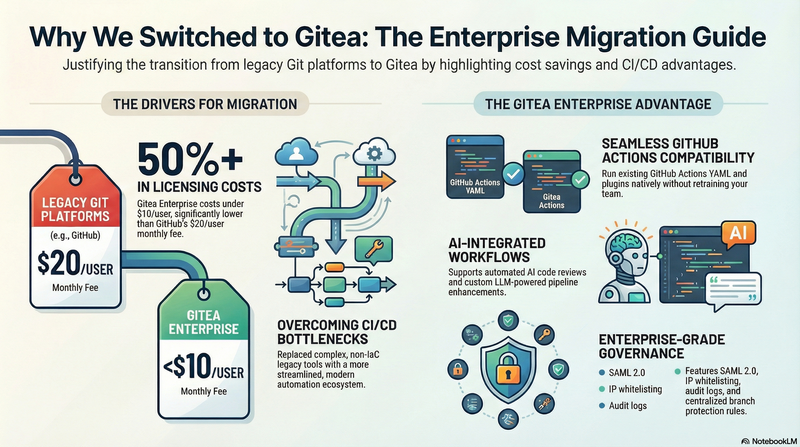
As cross‑department collaboration expanded within the company, the licensing cost of related software rose significantly. The number of accounts that logged in within the last 14 days reached nearly 500. Using GitHub as an example, enterprise licensing costs around USD 20 per user per month, and even with discounts it still comes to roughly USD 17. At this scale, licensing becomes a major expense. Bitbucket Data Center’s enterprise license is also far from cheap, often limiting cross‑department adoption and slowing collaboration efforts.
By contrast, the licensing model of Gitea Enterprise is far more flexible. With high‑volume license purchases, the cost per account can be reduced to under USD 10. For large organizations, this cost difference is substantial and significantly lowers the barrier to collaboration.
🚀 CI/CD Was the Biggest Reason for Our Migration
The most critical factor that influenced our team’s decision to move away from Bitbucket Data Center was the usability and flexibility of the CI/CD ecosystem. In modern development workflows, if a Git platform lacks an autonomous, easy‑to‑manage, and extensible CI/CD system, it’s almost like losing both arms and legs — development efficiency suffers tremendously.
Although Bitbucket has its own CI/CD product, Bamboo, it comes with notable drawbacks:
- Complex setup and steep learning curve
- Workflow design that does not align with IaC (Infrastructure as Code) principles
- High resistance when promoting it across teams, as complicated tools reduce adoption willingness
For teams fully embracing automation and IaC, Bamboo becomes a bottleneck rather than an enabler.
🔥 Gitea Actions: The Best Ecosystem‑Compatible Alternative to GitHub Actions
When evaluating alternatives, we paid close attention to CI/CD ecosystem trends — and the fastest‑growing system today is clearly GitHub Actions. For this reason, the Gitea team built a GitHub Actions‑compatible CI/CD solution:
This brings several major advantages:
1. Full Compatibility With GitHub Actions Syntax
- Seamlessly migrate existing GitHub Actions YAML
- Use the enormous library of GitHub Actions plugins and examples
- Engineers don’t need to learn a new CI/CD system
For developers already familiar with GitHub workflows, migration cost is extremely low.
2. Supports Cross‑Team Deployment and Self‑Hosted Runners
Gitea allows each team to host its own runner:
- More flexible resource allocation
- Each project can maintain its own CI/CD pipelines
- No dependency on a central system
- Significantly lowers cross‑team usage barriers
A major advantage for large organizations.
3. AI Workflow Integration for Automated Code Review
As AI becomes increasingly common, we integrated 👉 Anthropic Code Review Action into Gitea Actions. We also developed LLM‑Action, enabling teams to incorporate AI into their workflows.
This means:
- PR creation can trigger AI‑driven automated code review
- CI/CD pipelines integrate AI deeply
- Teams can build their own AI toolchain
This makes the entire development workflow smarter and more modern.
Gitea Enterprise Features
The following is compiled from the official website (Gitea Enterprise). Key features include:
🔐 1. Branch Protection Inheritance
Organizations can define branch protection rules at the org level and automatically apply them to all repositories under it — ideal for large org consistency.
🛡️ 2. Dependency Scanning
Automatically scans open‑source dependencies and alerts users about security vulnerabilities, reducing supply chain risks.
🔒 3. Advanced Security Features
Enterprise edition provides enhanced security, including:
- IP Allowlist — restrict access to specific IP ranges
- Mandatory 2FA — enforce multi‑factor authentication
Perfect for high‑security enterprise environments.
🧩 4. SAML 2.0 Authentication
Supports SAML 2.0 SP, enabling seamless integration with enterprise identity providers like Azure AD, Okta, and Keycloak.
📜 5. Audit Log
Provides detailed logs to track:
- User actions
- System changes
- Sensitive operations (permissions, configuration changes)
Useful for compliance requirements such as ISO, SOC2, or financial regulations.
🔧 6. Familiar Upgrade Path & Smooth Transition
Enterprise edition is built on top of the open-source version, with nearly identical configurations. This ensures:
- Smooth switching between versions
- Simple upgrades
- LTS (Long-Term Support) availability
Anyone who used open‑source Gitea knows how easy upgrades are.
📈 7. Premium Support
Enterprise customers receive:
- Official technical support
- Online customer service
- Access to customer success resources
Ensuring fast and reliable troubleshooting.
Migration Tooling
I developed a migration tool myself: 👉 Bitbucket Data Center → Gitea Migration It transfers projects, permissions, and team configurations from Bitbucket to Gitea.
If you encounter any issues during use, feel free to open an Issue — I’m happy to help troubleshoot and resolve permission mapping, team structure transfer, or other needs.
Conclusion
We covered many of the features and advantages of Gitea Enterprise. Gitea offers an ideal balance of cost efficiency, flexibility, ecosystem compatibility, and modern DevOps capabilities. It not only resolved the limitations we faced with Bitbucket DC but also significantly improved our CI/CD, governance, security, and development experience.
In an era where cross‑team collaboration is becoming the norm, Gitea is the platform that fits us best.
For organizations requiring long‑term stable support, Gitea Enterprise is an excellent choice. The Gitea team assisted us in several key areas — including building a highly available (HA) architecture and deploying Gitea Runners on Kubernetes. These results were made possible through close collaboration, helping us advance our internal DevOps platform more efficiently.